
Add ToolGrid tools to your website. Launch and earn with White-Label.
Choose any tool, paste one snippet, and run it on your own domain with your branding. Sell to your clients at your own price with one simple subscription and no revenue share.
Exploring tools first? Browse the catalog on the homepage — then return here for the setup guide when you are ready.
Security note: The installation snippet is for authorization, not data exploitation.
For community embeds, the script loads the standard free experience. For White Label, it authorizes verified domains so selected tools can unlock premium limits and your branding for visitors — similar in spirit to snippets from analytics or chat platforms.
Earn with White Label
View monthly pricingThe ToolGrid White Label plan lets you run utilities under your brand and domain, charge your own price, and keep 100% of what you earn. You pay one subscription per tool slot while we handle updates, hosting, and infra.
Benefits
- Sell tools with your own branding and your own domain.
- Unlimited embed site entries and domains per site (same verification flow as Site toolkit).
- From $14.99 per tool per month when billed yearly ($19.99 per tool per month on monthly billing — see pricing).
- Get 661+ tools in one subscription and set your own selling price to clients.
- No revenue share or percentage cuts on your earnings.
- Unlimited usage under your plan scope with no per-seat pricing.
- Future ToolGrid tools are included as the platform grows.
Revenue and growth use cases
- Add tools on client websites and charge a monthly recurring fee.
- Embed tools on your own website to increase traffic and session time.
- Keep visitors on your website instead of losing them to external tool sites.
Why choose the White Label
- Easy integration: paste a small snippet and go live fast.
- Simple verification in Site toolkit (White Label ); no complex setup.
- No payment processing or tooling inventory burden for your team.
- One small subscription for each tool slot you select and you can pick up to 661+ tools from our catalog.
- Device-friendly layouts: tools automatically adapt to desktop, tablet, and mobile without per-device tweaks.
- No hidden fees or surprise paywalls.
- Start selling from day one after setup.
The White Label plan is from $14.99 per selected tool per month when you pay yearly ($19.99 per tool per month on monthly billing). See pricing for slot totals and billing options. No percentage cut, no seat pricing, and no extra charge when your business scales.
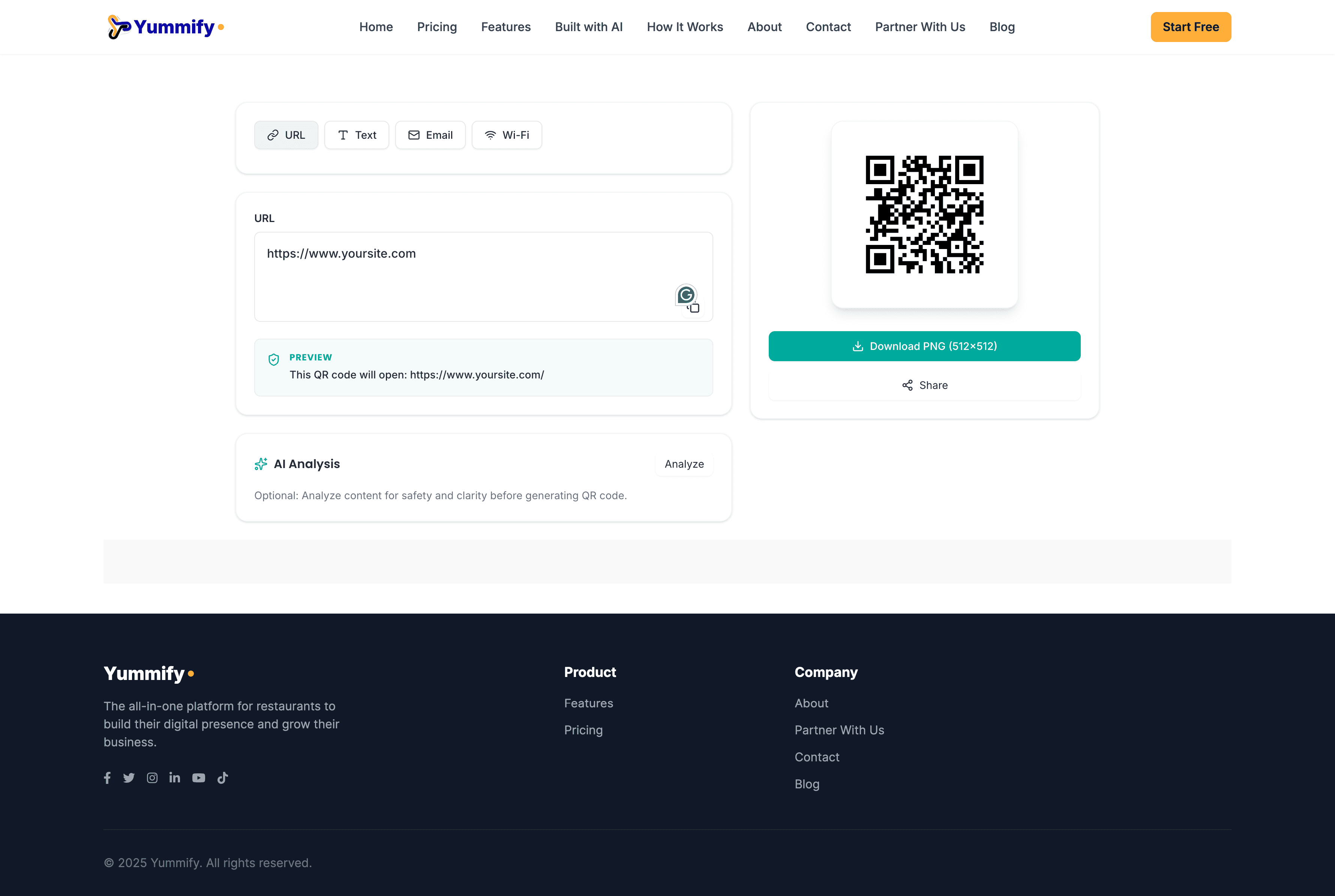
Example: how a ToolGrid utility appears on your website
This preview shows our QR Code Generator embedded on a sample website named Yummify (example only).
You can choose any tool from our collection of 661+ tools.
With the White Label plan, it can run on your domain with your branding for tools you select. Community embeds keep standard ToolGrid presentation.
Community vs White Label
Community embed
- Available to every signed-in user — Community, Business, or otherwise. You do not need a paid plan to copy the free embed snippet.
- Standard website snippet for supported tools.
- Easy placement on blogs, docs, and community pages.
- Core/free tool functionality for visitors.
- ToolGrid attribution remains visible.
- No domain verification or paid embed session required.
White Label plan
- Requires an active White Label plan subscription — Site toolkit, branded premium embeds for selected tools, and resale are not included on other plans by default.
- Site toolkit self-service: domains, keys, tool-slot picks, snippets, and rotation.
- Unlimited embed site entries and unlimited verified domains per site.
- Remove branding on embeds for tools you select inside your slots; others stay community-style.
- Built for agencies and resale: your client pricing with no ToolGrid revenue share.
How to embed
Community embed
- Sign in to ToolGrid (any account — free or paid; your platform plan does not change access to the free community snippet).
- On a supported tool page, open Add to website.
- Copy the standard free snippet.
- Paste it into your blog, docs, community page, or tutorial website.
- Publish and test on desktop and mobile.
- Keep attribution visible for community/free usage as required by policy.
White Label plan
Subscribe to the White Label plan, then open Site toolkit to manage domains, keys, tool slots, and snippets.
- Create your ToolGrid account and subscribe to the White Label plan (per-tool slots; see pricing).
- Open Dashboard → Site toolkit and create an embed site entry.
- Add your primary website domain in Site toolkit and choose DNS TXT or HTML file verification.
- Copy the verification value from Site toolkit and complete verification — DNS TXT recommended, HTML file fallback.
- Click Verify in Site toolkit after DNS or the HTML file is live and reachable.
- Use tool search in Site toolkit, pick a tool in your slot selection, and copy the snippet with data-site-key.
- Paste the snippet into your website where you want the tool to appear.
- Confirm live behavior: tool loads, premium limits unlock for visitors, and branding follows your White Label picks.
- Rotate or revoke keys from Site toolkit when needed.
Pricing and slot counts: See pricing.
WordPress integration (Site toolkit)
If your site runs on WordPress, you can skip pasting raw HTML: install the ToolGrid Embed plugin and drop one shortcode into a page or post. Domain verification, keys, and embed behavior are the same as the HTML snippet — the plugin only makes setup easier for non-developers.
Download the plugin ZIP and copy your personalized shortcode from Dashboard → Site toolkit → Integrations. You can also grab the ZIP directly at toolgrid-wp-embed.zip if you already completed setup.
- Sign in and open Dashboard → Site toolkit. You need embed access (for example Business with Site toolkit, the Lifetime Site toolkit add-on, or a White Label subscription — see pricing for your account).
- Create or select a site entry, verify your domain (DNS TXT or HTML file), and generate a site key — the same setup as the HTML embed snippet.
- In Site toolkit → Integrations → WordPress, download the plugin ZIP, then pick your tool with the search bar.
- In WordPress admin: Plugins → Add New → Upload Plugin, choose the ZIP file, Install now, then Activate.
- Return to Site toolkit and copy the shortcode from the WordPress card (it includes your site key and embed paths for the tool you selected).
- In the WordPress editor, paste the shortcode into a Shortcode block (Block editor) or the Classic editor, then publish or update the page.
- Open the live page on your verified domain and confirm the tool loads. Behavior matches the HTML snippet: checkout session rules, keys, and domain checks are identical.
Shortcode tag: toolgrid_embed. Multiple tools on one page: add several shortcodes; one embed script loads for the page.
Domain verification (White Label)
Community embeds skip this. With an active White Label plan, your verification value and the Verify control live in dashboard Site toolkit before paid embed sessions issue for your picked tools.
Step-by-step below matches Site toolkit for White Label plan subscribers.
DNS propagation can take anywhere from a few minutes to a few hours, depending on your provider.
Option A (Recommended): DNS TXT
- Open your DNS provider (Cloudflare, Namecheap, GoDaddy, etc.).
- Add a TXT record on root/apex host (`@`) or your exact domain host.
- Set value to the exact verification string shown in Site toolkit (White Label).
- Wait for propagation, then click Verify in Site toolkit.
Recommendation: use DNS TXT for production reliability and easier repeat verification.
Option B: HTML File
- Create file at `/.well-known/toolgrid-verification.txt` on your verified domain.
- Put only the exact verification string in the file (single line).
- Ensure URL is publicly reachable with HTTP 200 response.
- Click Verify in Site toolkit (White Label).
Use this when DNS editing is restricted, but web file deployment is available.
Use Cases
- SaaS help centers: place utilities inside docs so users finish tasks without leaving your site.
- Agency/client portals: offer converters, formatters, and calculators inside your branded portal.
- Developer docs and blogs: add JSON/XML/regex/code helpers inline with tutorials.
- Education/training sites: include practical tools in lessons for hands-on learning.
- Internal ops dashboards: centralize utility workflows for support and operations teams.
Advantages
- Community embed snippets are free for every signed-in ToolGrid user.
- White Label plan: about $0.50/day per selected tool at yearly-effective billing (see pricing for monthly billing and slot totals).
- The catalog includes 661+ tools you can embed or sell with your own pricing on White Label.
- No seat pricing on White Label for how you serve site visitors under the plan.
- Privacy-first product philosophy.
- Continuous platform updates and responsive embed layouts.
White Label per-tool reference: about $0.50/day each when billed yearly (~$14.99/tool/mo) — see pricing for monthly billing and slot math.
FAQs
Can I use ToolGrid on WordPress without pasting HTML or editing my theme?
Yes, when you use Site toolkit: install the ToolGrid Embed plugin from Dashboard → Site toolkit → Integrations (ZIP download), activate it, then paste the shortcode from the same page into your post or page. Verification and keys work the same as the HTML snippet; the plugin outputs the same embed markup and loads embed.js for you.
Who can use the free community embed?
Any signed-in ToolGrid user — Community, Business, or anything else. The community snippet is the same free tier for your visitors; buying other plans does not change that. White-label branding and premium embed sessions for selected tools require the White Label plan and Site toolkit.
How do I add ToolGrid tools to my website?
Community: sign in, open Add to website on a supported tool page, paste the free snippet anywhere it is allowed. Site toolkit (eligible plans): open Dashboard → Site toolkit, verify your domain, manage keys, then paste either the HTML snippet or — on WordPress — our plugin shortcode from the Integrations section.
Can visitors use premium limits without their own ToolGrid account?
On the free community embed, visitors get the standard free tool limits. On the White Label plan, tools you select inside your subscription slots can unlock premium limits and your branding for visitors on verified domains; other tools keep community-style behavior.
How many domains can we use on the White Label plan?
The White Label plan includes unlimited embed site entries and unlimited verified domains per site in Site toolkit, using DNS TXT or HTML file checks.
Why should we not build our own utilities instead?
Because build and maintenance cost usually dwarfs subscription cost. You get 661+ maintained tools, hosting, and updates; recreating that in-house typically means significant engineering, QA, and long-term ops.
Why choose ToolGrid?
Broad catalog, embed-first delivery, privacy-conscious design, and straightforward subscription models for community and White Label use cases.
Does this lock us into one stack?
No. The snippet is stack-agnostic and works with common CMS platforms, static sites, and modern frameworks. On WordPress, Site toolkit users can install our plugin and use a shortcode instead of pasting raw HTML.
What happens if our Site toolkit key is leaked?
Rotate or revoke keys from Site toolkit. Domain verification and server-side checks add protection for licensed embed flows.
Will this snippet slow down our website?
The script is lightweight and async-loaded. The tool loads where you place it and does not block full-page rendering.
Does ToolGrid read private data from our full website?
No. Authorization follows embed licensing rules. It is not a crawler for your full site content or private backends.
Can we control where the tool appears on our page?
Yes. Placement is wherever you paste the snippet. The UI is responsive and adapts to your layout.
What if our visitors are not technical?
Tools are designed for end users. Visitors do not need a ToolGrid account for normal embedded usage.
Can we remove ToolGrid branding?
Community embeds keep ToolGrid attribution. Remove branding on selected tools with an active White Label plan (per-tool slots) or the optional Lifetime white-label add-on where applicable.
Is there seat-based pricing for White Label?
No per-seat pricing for how you serve visitors under the White Label plan scope. You subscribe for tool slots and properties as described on the pricing page.
What if we change domains later?
In Site toolkit, remove the authorized domain, then add and verify the new one.
Can we temporarily disable access during an incident?
Yes. Revoke or rotate keys from Site toolkit. Platform-side controls can suspend an embed site entry when needed.
Do you support high traffic and burst usage?
Yes, with monitoring and protections. For very high sustained traffic, contact support to plan limits.
Will adding tools affect our SEO pages?
You control page SEO. Place the embed where it fits your content and UX.
How do we get help if integration fails?
Check Site toolkit diagnostics (domain status, key status, usage). Contact ToolGrid support with your site and domain details.
Can we resell ToolGrid tools under our own pricing?
Yes. The White Label plan is built for that. You set client pricing and billing; ToolGrid delivers the platform and updates.
Do you take any percentage from our customer revenue?
No revenue-share percentage on your client earnings in this model.
Can we use the White Label plan for both clients and our internal team?
Yes, within your authorized setup and plan scope.
Are future tools included under the White Label plan?
New tools ship over time. Your quantity is how many tools you can select for premium plus white-label embeds at once; change picks in Site toolkit. Unselected tools embed in community-style mode.
How quickly can we go live with the White Label plan?
Most teams verify a domain in Site toolkit, paste a snippet, and publish without a long cycle.
Are there hidden setup or per-seat fees for the White Label plan?
No hidden setup fees. See the pricing page for transparent subscription scope.
Still have questions? Contact us.